CSE2305 - Object-Oriented Software
Engineering
Assessment
Develop a design for Bernard's Book shop.
The first part of developing a design is to look for possible classifications
from which classes and objects can be discovered. Here a combination of classical
and conceptual classification can help (refer Lecture
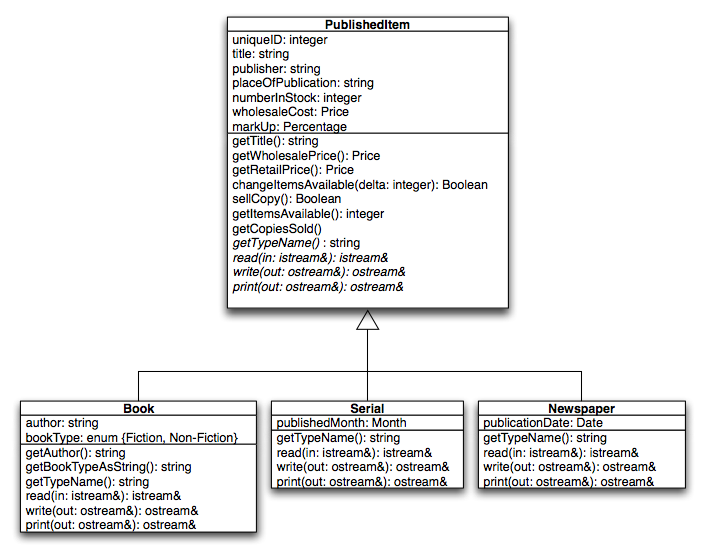
topic 15). Most of the items stocked by the store have a lot in common, so
we can devise a base level abstraction that represents items that are sold by
the store. We'll call this class PublishedItem. More specialised classes will
inherit from this base class, such as books and serials.
PublishedItem represents the base level abstraction. Notice how
only the required methods are exposed in its public interface. We assume that
classes like string,
Percentage and Price are value objects (see Lecture
Topic 17 for details). We can use the standard library string class. Percentage and Price could
be typedef'd to floats as a first step.
The Print function of PublishedItem and its sub-classes
is a good example of a polymorphic function – what
it does depends on type. For example, if we are printing a Book object the
code would be something like this:
ostream& Book::print(ostream& s) const
{
	s << getTypeName() << "(" << getBookTypeAsString() << ")" << ": " << title << endl;
	s << "Author: " << author << endl;
	s << "Published by: " << publisher << endl;
	s << "Place of publication: " << placeOfPublication << endl;
	s << "Retail Price: " << getRetailPrice() << ", " << getItemsAvailable() << " copies available." << endl;
	return s;
}
Serial and Newspaper would define a print function
with different behaviour.
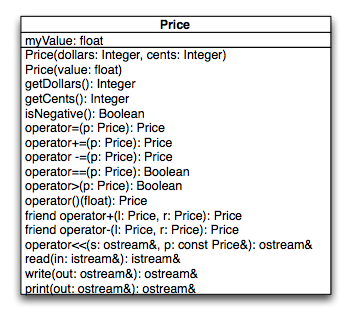
Looking more closley at the Price type, it may become important to make Price a
class in its own right (to aid with expanded options such as rounding, change,
pretty printing, currency conversion, etc.). Price has
been expanded in the diagram below for this reason (it is still a value object
however).
A number of classes so far need to define methods to read from a stream, write
to a stream and print to a stream. The read/write methods are for saving and
loading objects to a stream (a serialisation mechanim) – something
that forms part of a persistence
mechanism. The print method is used to print the object in
a human readable format (which
can be used when printing search matches for example). Because this appears
in many classes it makes sense to factorise these methods into separate class
and get all the necessary classes to inherit from this class. As we'll need
to input object information from the user, we'll also define a get method,
that reads object state in from the user (i.e. prompts to enter values like
the Book's title). The base class, Streamable, contains only
pure virtual functions (defining an interface but
no implementation
– that is left to subclasses). From Streamable's point
of view all we know is that the object can be read, written and printed to
a supplied stream. The getObject method is used to return an object read from
a stream - this will be required to stream PublishedItem and its subclasses
from files. Please see Stroustrup section 25.4.1 for more details.
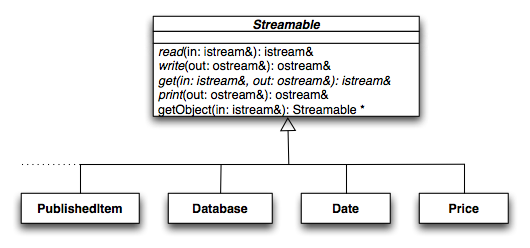
This type of class is known as a mixin (or property) class. It represents a "uses a" rather than an "is a" relationship, even though it uses inheritance (usually multiple inheritance).
The next stage is the database component of the system. We need a database
of PublishedItems. We need
to add and delete, search and
sort PublishedItems. Here there
are a number of possible solutions. We could use the List class from assignment
1 or the associative Array class
from assignment 2, with the key type a string or UniqueID and
the data a pointer to a PublishedItem. We can also use the idea
of genericity and develop a generic "database" class.
This will effectively be a wrapper class that can wrap around an STL
container class.
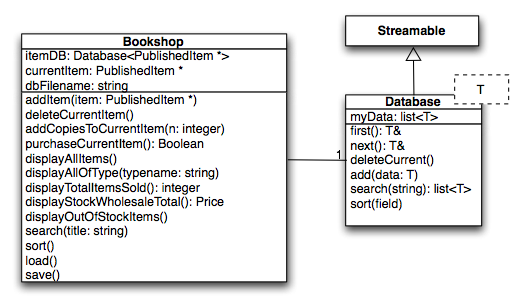
The Bookshop class implements the functionality required
by the assignment specification. If the requirements change, then this class
would likely have to change as well. Notice how the BookshopManager class is
not streamable – why?
A simpler (hence prefered) solution would be to use an STL list or vector class
to replace the custom Database class show above. These container
classes are not directly streamable, however it is a simple matter to iterate
over the container and stream each object.
The diagram doesn't tell us much about how the system interacts with the user. A more complex solution decouples the functionality of the database from the way it is interacted with – this gives us much greater flexibility to change the interaction and functionality of the system independently. The method presented here is based on a couple of simple design patterns: the Command and Composite patterns.
Users of the system interact with menus. A menu has a title and the ability
to add other Menu objects to it. The display method
causes the menu to be displayed and then waits for the user to make a selection.
The select method is called
if the particular menu has been selected (clicked on in the case of a graphical
user interface or it's particular number selected for a text-based menu). Notice
two sub-classes of Menu: MenuItem, representing a
single Menu item, and CompoundMenu representing
a collection of Menus. When a MenuItem is asked to display it just prints its
title, when a CompoundMenu is asked to display it prints all
its Menu object's titles and waits for the user to make a selection. If the
user's selection happens to be a CompoundMenu object then that object's display method is called and a new-sub menu is displayed. If the user has selected
a MenuItem that menu item also stores a Command object, which is executed at
this point, performing the required action.
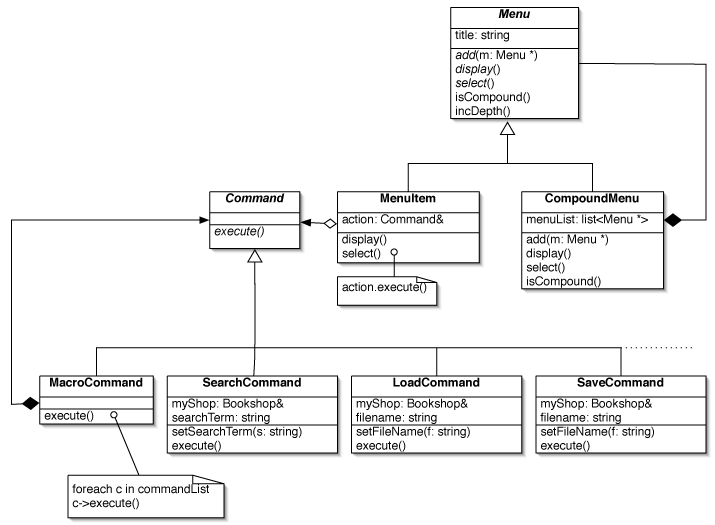
The Command classes represent objects that perform commands.
The only thing a Command object can do is execute().
What execute() actually does
depends on
the concrete class implementing the abstract Command class's interface.
A new class is required for each command, but by breaking more complex commands
into a
set
of simple steps we can combine them in a MacroCommand object.
This gives us a lot of flexibility to change the functionality of our system,
even at
run
time (for example based on licence type we can add extra features).
Not all the commands needed for the full system are show here (that's what the dotted line means).
The object diagram below shows a sample of the menu structure for the Bookshop system:
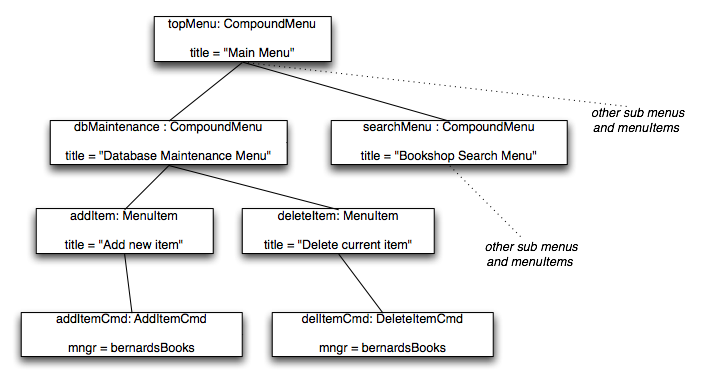
Notice how the menu structure and the actions they perform are kept separate – an instance of the Model/View/Controller pattern (except that view is implicit). If we wanted to get really fancy we could make our menus streamable, giving us the ability to configure the menu system from an external file at runtime – also offering the ability for the user to customise menu layouts and options (for example a novice user might not want so many options in the main menus or may be restricted in the types of database modification they can do).
Since the responsibility for running the system has been delegated to Command classes
we need to create a BookshopSystem controller
class. This class controls a BookshopManager object via a collection of menus
and commands.
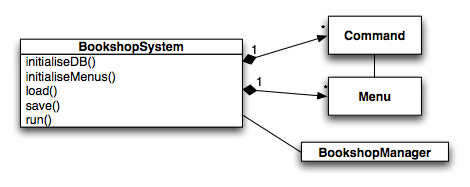
You can download a set of Menu and Command classes suitable for use in the above design here.
Last Modified: October 1, 2005